FilledButton
Filled buttons have the most visual impact after the FloatingActionButton, and should be used for important, final actions that complete a flow, like Save, Join now, or Confirm. See Material 3 buttons for more info.
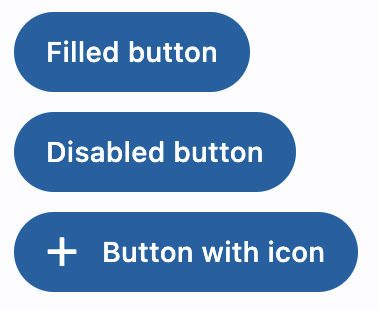
Examples
Filled button
- Python
import flet as ft


def main(page: ft.Page):
    page.title = "Basic filled buttons"
    page.add(
        ft.FilledButton(text="Filled button"),
        ft.FilledButton("Disabled button", disabled=True),
        ft.FilledButton("Button with icon", icon="add"),
    )

ft.app(target=main)
Properties
autofocus
True if the control will be selected as the initial focus. If there is more than one control on a page with autofocus set, then the first one added to the page will get focus.
content
A Control representing custom button content.
icon
Icon shown in the button.
icon_color
Icon color.
style
See ElevatedButton.style for more information about this property.
text
The text displayed on a button.
tooltip
The text displayed when hovering the mouse over the button.
url
The URL to open when the button is clicked. If registered, on_click event is fired after that.
url_target
Where to open URL in the web mode:
_blank(default) - new tab/window._self- the current tab/window.
Events
on_click
Fires when a user clicks the button.
on_hover
Fires when a mouse pointer enters or exists the button response area. data property of event object contains true (string) when cursor enters and false when it exits.
on_long_press
Fires when the button is long-pressed.